
A Multi-Factor Image-Based Authentication Scheme for Secure
Facilities
Qutaiba Albluwi
1
a
, Sara AlSatari
2
, Anfal Alqudah
2
and Liyan AlQadome
2
1
School of Computing and Informatics, Al Hussein Technical University (HTU), Amman, Jordan
2
King Abdullah II School of Engineering, Princess Sumaya University of Technology (PSUT), Amman, Jordan
Keywords: Graphical Passwords, Multi-Factor Authentication, Physical Access Control.
Abstract: This paper introduces a multi-factor authentication scheme that uses a novel approach to image-based
passwords. The proposed scheme prompts the user to select any image as a password and integrates it into a
set of generated decoy images. The password image is obfuscated within the decoy set, encrypted as a single
composite file and hashed for secure storage and verification. User Biometric data is used to derive unique
user keys for securing the image-password and act as a second layer of authentication. The proposed scheme
is characterized by its simplicity, usability and security. It integrates a suite of secure cryptographic protocols
and implements a bundle of security controls to address known risks associated with graphical passwords.
The scheme was tested through a developed prototype that was deployed at a secure facility to control access
to physical entry points. The designed scheme is flexible and can be deployed as a general-purpose
authentication solution for protecting physical systems.
1 INTRODUCTION
Passwords have long been an essential component of
computer security, serving as a primary measure for
authentication and access control to digital assets and
services. However, security researchers have
highlighted several weaknesses with traditional
textual passwords like using short or weak passwords,
reusing the same password across multiple accounts,
and being vulnerable to social engineering, phishing,
and keylogging attacks.
The research community developed several
controls to mitigate risks associated with textual
passwords. Examples include strict policies on
password length and structure, and using multi-factor
authentication as an additional layer of security.
Alternative password schemes were also proposed,
including pattern-based keys, graphical passwords,
tokens, and biometric authentication. However, each
of these solutions comes with its own set of risks and
vulnerabilities. Our work falls in the intersection
between multifactor authentication and graphical
passwords, with more emphasis on the latter domain.
The concept of using images in authentication
systems is not new. It has a legacy of two decades of
a
https://orcid.org/0009-0003-6535-175X
research, but remains an active area that attracts
interest from both the research and industry
communities. Common approaches prompt the user
to draw a pattern, make specific selections on an
image, identify objects or highlight similar or distinct
regions.
A common feature of most graphical password
schemes found in the literature is that the secret is
either embedded in an image or distributed across
multiple images. These schemes provide a simpler
memorable visual alternative to textual passwords,
but from a user-perspective may appear complex in
the registration or authentication processes. In
addition, some of these schemes produce high error
rates due to small deviations when comparing the
passwords. They also bring new security concerns
like high predictability and being vulnerable to
shoulder surfing.
In this paper, we adopt a simple scheme where the
user selects a single image, and that image itself
serves as the secret. This non-complex scheme
provides user-friendly registration and authentication
procedures offering a usability advantage over other
complex systems. At the same time, since the key
space for images is operationally infinite, this offers
54
Albluwi, Q., AlSatari, S., Alqudah, A. and AlQadome, L.
A Multi-Factor Image-Based Authentication Scheme for Secure Facilities.
DOI: 10.5220/0014297900004848
Paper published under CC license (CC BY-NC-ND 4.0)
In Proceedings of the 2nd International Conference on Advances in Electrical, Electronics, Energy, and Computer Sciences (ICEEECS 2025), pages 54-63
ISBN: 978-989-758-783-2
Proceedings Copyright © 2026 by SCITEPRESS – Science and Technology Publications, Lda.

a security advantage over textual passwords, which
are more vulnerable to brute-force attacks.
To overcome security concerns associated with
graphical passwords, the proposed scheme integrates
the graphical password in a three-factor
authentication system. The first factor is biometric
authentication using fingerprints, the second is
knowledge-based, involving the user selecting an
image as their password, and the third is token-based,
relying on a USB drive to store encrypted and
obfuscated data related to the selected image. The
above three factors can be viewed as three layers of
authentication, and also as a single sophisticated
authentication system where the layers are
interconnected.
The proposed system integrates established
cryptographic protocols with a range of security
controls to mitigate known threats to graphical
passwords. The user's biometric data is used to derive
cryptographic keys, which in turn are used to generate
a set of decoy images. The image password is
embedded within this decoy set in an obfuscated
manner, producing a single composite binary stream.
Subsequently, the stream is encrypted in blocks to
fragment the secret. Finally, it is processed through
cryptographically secure hashing functions to
preserve the confidentiality and integrity of the image
password.
There are two main contributions of this work.
First, the proposed methodology of embedding the
image-secret within decoy images using
cryptographic functions is original and is distinct
from other approaches found in the literature.
Second, the procedure of integrating the graphical
password within a three-factor authentication system,
combined with the implementation of a set security
controls, provide a relatively resilient solution to
known threats. This secure integration is done a
manner that does not compromise simplicity and
usability.
A physical prototype reflecting the design
features was developed. It was tested and deployed in
a secure facility as a measure to control physical
access to specific gates. However, the scheme is
generic and flexible and can be equally deployed to
protect other physical assets.
After this introductory section, the document is
structured into five sections. Section 2 surveys
relevant research works and provides background
information. Section 3 provides detailed descrption of
the design of the proposed system, while Seciton 4
highlights configuration and implementation
considerations. In Section 5, we present a security
analysis of the proposed scheme. Finally, we
highlight the main contributions and future directions.
2 RELATED WORK
Image-based passwords are founded on the principle
that images, unlike textual information, leverage the
human cognitive advantage in visual memory.
Humans typically recall images with greater accuracy
and over longer durations compared to text-based
content (Shepard, 1967). This cognitive strength
underpins graphical authentication systems, which
are designed to improve memorability while
maintaining reasonable security. From a security
perspective, graphical passwords demonstrate strong
resistance to conventional cryptanalytic attacks,
particularly brute-force and dictionary attacks, due to
their substantially larger key space (Khedkar, 2024).
Graphical password schemes are classified under
knowledge-based authentication systems, where the
user is required to provide something they know
(Abraheem, Bozed, & Eltarhouni, 2022; Suo, Zhu, &
Owen, 2005). The other two authentication systems
are token-based authentication and biometric
authentication. In token-based systems, the user
provides something they own, like a phone or a card.
Biometric systems rely on the user's unique
physiological features like fingerprints, iris scans, and
facial recognition.
Graphical passwords depend heavily upon two
cognitive mechanisms: recognition and recall. In
recognition-based schemes, users enroll by selecting
a sequence of images or objects to serve as pass-
images. During authentication, the system displays a
sequence of images, and the user must identify the
correct pass-images from among distractors (Dhamija
& Perrig, 2000), or in some cases, identify pass-
objects within a composite image (Man, Hong, &
Mathews, 2003). Some implementations involve
users selecting the pass-images in a predefined
sequence (Jansen, 2004), while others employ multi-
step authentication, in which the user must correctly
identify one pass-image at each stage (Takada &
Koike, 2003).
In recall-based graphical password schemes, users
generate a drawing or pattern that functions as their
authentication secret. During login, they are required
to accurately reproduce this drawing. One of the
earliest methods, known as DAS: Draw-A-Secret
(Jermyn, Mayer, Monrose, Reiter, & Rubin, 1999),
involves the user drawing an object or pattern on a
two-dimensional grid, with the input compared to a
stored reference pattern. Another well-known
A Multi-Factor Image-Based Authentication Scheme for Secure Facilities
55

approach, PassPoints (Wiedenbeck, Waters, Birget,
Brodskiy, & Memon, 2005), requires users to select
specific click-points on a background image. A more
widely adopted method, especially on mobile
devices, involves drawing a continuous pattern on a
grid or canvas interface.
Several studies have proposed hybrid
authentication schemes that combine elements of
text-based and graphical password systems, or
integrate both recognition and recall-based features.
In (Singh, Nedungadi, & Radhika, 2023), users
register by providing a textual password along with a
set of five selected images. During authentication, the
user first enters the textual password; upon successful
verification, they are prompted to identify the
previously selected images from a given set. In
another study (Adamu, Mohammed, Adepoju, &
Aderiike, 2022), the authors introduced a three-step
authentication mechanism that incorporates textual
passwords, one-time passwords (OTPs), and a recall-
based graphical component in which users must select
specific points on an image.
Among the six common types of password
attacks, namely brute-force, dictionary attacks, social
engineering, spyware, guessing, and shoulder surfing
Albayati & Lashkari, 2014), graphical passwords
generally offer greater resistance compared to textual
passwords. The primary exception is shoulder
surfing, which remains a significant vulnerability in
image-based authentication systems. An attacker in
close proximity, or using a surveillance device such
as a camera, can observe or record the user's input and
potentially replicate it to gain unauthorized access.
Based on our review of existing literature, there is
no graphical-based scheme that is immune to
shoulder surfing attacks. Different proposed schems
attempt to mitigate the risk of shulder surfing rather
than eliminating it. The used mitigation strategies for
shoulder surfing can be broadly categorized into two
approaches: randomization and obfuscation.
The randomization strategy is designed to vary the
layout or structure in which the graphical password is
presented during each authentication attempt. A basic
implementation involves displaying a grid of images,
where the position of the user's password image
changes dynamically across login sessions (Bijoy,
Kavitha, Radhakrishnan, & Suresh, 2017). In another
scheme (Chaluvadi, Chitteti, Challa, & Srithar, 2023),
users select a sequence of images that follow a
particular pattern. During authentication, a different
set of images is presented, distinct from the original
ones, yet the underlying pattern remains consistent.
A more advanced approach is introduced in
(Harisha, Naik, Vasudeva, Shrilakshmi, & Kothwal,
2024), where users provide personal information
during the registration phase. At login, the system
generates personalized images derived from this
information. These images are tailored to reflect user-
specific attributes, enabling a customized and less
predictable visual authentication.
The obfuscation strategy involves generating a
sequence of images derived from the original
password image, with each image retaining key visual
features while incorporating variations that
distinguish it from the original. This approach
reduces the risk of direct observation and replication.
For instance, in (Kawamura, Ebihara, Wakatsuki, &
Zempo, 2022), a sequence of modified images is
produced by applying different image filters to the
original image. During each login session, a distinct
filter is used, and the altered image is presented to the
user. Another example, employed in commercial
systems is called PassFaces. It utilizes decoy images
in facial recognition-based authentication. These
decoys preserve certain facial characteristics of the
original password image while introducing controlled
variations to make them visually similar yet non-
identical (Eljetlawi & Ithnin, 2008).
Another important security consideration in
graphical password systems is the storage and
retrieval mechanism used during authentication. One
of the simplest methods involves generating and
comparing image hashes, similar to the verification
process used for textual passwords (Singh,
Nedungadi, & Radhika, 2023). In another approach
proposed in (Mukerjee, Som, Khatri, & Mathur,
2019), the image is first converted into a binary
representation, then encrypted and stored. During
authentication, the input image is decrypted and the
resulting data is compared to the stored version for
verification.
Besides security, usability is the second most
important factor for evaluating graphical password
schemes. A summary of usability evaluation criteria
for graphical passwords, based on ISO standards and
other academic sources, is presented in (Eljetlawi &
Ithnin, 2008). The first criterion is effectiveness,
which relates to the reliability and accuracy of the
authentication process. The second is efficiency,
which measures how well the scheme performs in
practical, real-world scenarios. The third is
satisfaction, encompassing ease of use, ease of
enrollment, ease of memorization, and ease of
execution. the perceived quality of the graphical
interface and the overall user experience, i.e., being
pleasant to the user. In a more recent study
(Khodadadi, Javadianasl, Rabiei, Alizadeh, Zamani,
& Chaeikar, 2021), the authors highlighted that ease
ICEEECS 2025 - International Conference on Advances in Electrical, Electronics, Energy, and Computer Sciences
56
of use, memorability, creation, learning, and
satisfaction are the most significant factors in
assessing usability for graphical password systems.
3 PROPOSED SYSTEM
Without loss of generality, the system design is
presented as a model for door access control systems
used in secure facilities. However, the design is
generic and can be applied as a physical security
control for protecting access to other physical assets.
For presentation purposes, we assume that the
biometric authentication method is fingerprint-based,
and the token authentication method involves USB
devices.
3.1 System Architecture
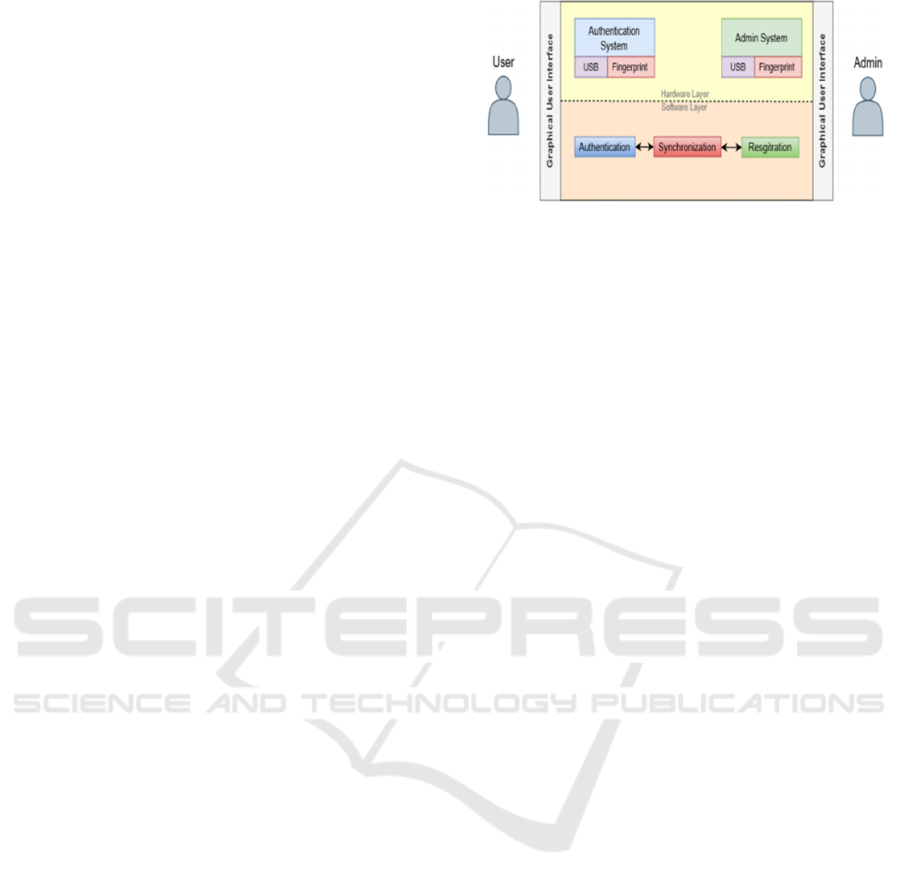
The proposed authentication system consists of a
centralized Admin Portal unit and several
Authentication Units. The Admin Portal is stored in a
physically secure location, while Authentication
Units are fitted at the secure gates and are available
for the system users.
The centralized Admin Portal is responsible for
two main categories of tasks, namely, managing user
registration, and synchronizing data with the
Authentication Units. It is structured as a computing
device, equipped with a fingerprint scanner and a
USB port. It should also have the capacity to securely
store the database that hosts the users' data.
Communication between the Admin Portal and the
Authentication Units is carried over secure channels.
An Authentication unit consists of a device that
supports a fingerprint scanner, a USB port, a keypad,
and a small screen. The system users interact with
these units for authenticating their identities to gain
access to the facility.
The system users include an administrator
responsible for configuring and managing the Admin
Unit, and several regular users seeking access to the
facility.
A depiction of the system architecture is presented
in Figure 1.
The system supports three main operations and
two user initiated functions. The main operations are:
user registration, data synchronization, and user
authentication. The user-specific functions are
password reset and password refresh. The details for
the procedures pertaining to each of the five
operations are presented below.
Figure 1: System Architecture.
3.2 User Registration
The registration process is conducted at the Admin
Unit. It requires the user to present an image-file to
be used as a graphical password. The image could be
stored on a USB drive provided by the user, retrieved
from the web, or downloaded from a cloud storage
service.
It is assumed that the user is known to the system
and is associated with a unique identifier (UID). For
first-time users, the system administrator must create
a new user profile before initiating the password
registration process.
The registration process consists of five steps:
configuration, user data collection, decoy generation,
hashing, and encryption.
In the configuration step, the user sets the system
security parameters. The provided values will reflect
the user's preferences and desired strength level.
Security parameters can be grouped into two
categories: cryptographic primitives and decoy
generation parameters.
Cryptographic primitives include encryption,
hashing and pseudorandom number generator
(PRNGs) parameters. For instance, the user may
select AES as the encryption algorithm, the counter
mode (CTR) as the block cipher mode of operation,
and the SHA3 as the hashing algorithm. The user can
selects one of the three key lengths currently
supported by AES (128, 192, or 256 bits) and SHA3
(224, 256, 384, or 512 bits).
For decoy generation, the user specifies a
parameter known as the decoy number, which
indicates the number of decoy images to be combined
with the actual image-password. Additionally, the
user may configure other parameters that govern key
derivation policies, password storage mechanisms,
and fingerprint security settings.
To support users who lack the technical
background to manually configure these parameters,
the system administrator can create a list of security
profiles with preconfigured values, and are labeled
A Multi-Factor Image-Based Authentication Scheme for Secure Facilities
57

with security terms that are easy for novice users to
understand.
During the second step, which is data collection,
the user interacts with the Admin Portal to provide
their registration credentials. This starts with the user
authenticating their identity, which allows the system
to identify their associated UID. Then the user is
prompted to provide their graphical password file and
to scan their fingerprint. Two or more fingerprint
samples are collected and used to construct the
fingerprint template, which is securely stored in the
database and linked to the user's UID.
In the third step, decoy generation, the system
constructs a set of random images to be used as
decoys. The number of decoy images to be
constructed is governed by the value of the decoy
number, discussed earlier. All the generated decoy
images share the same file size as the image password
file.
To secure the image password file, it is necessary
to obfuscate the file within a set of decoy images. The
security depends on the number of decoy images, not
their content. Therefore, one simple method to
produce the decoy images is to randomize the pixel
positions of the original image-password. When
displayed on a screen, the decoy images appear as
random pixel noise. To further enhance obfuscation,
a dictionary-based algorithm is employed to generate
filenames for the decoy images that are similar, but
not identical, to the original image-password
filename.
In the fourth step, hashing, a user-specific
cryptographic key is derived from the fingerprint
template. This key is referred to as the Derived Secure
Key (DSK). Since the DSK is generated from
biometric data, it is unique to each user. The DSK is
then used to generate a pseudorandom binary stream
with a length equal to that of the image-password.
The generated random bitstream is XORed with
the image-password. The resulting output is passed
into a cryptographic hashing function, and the
resulting hash digest is stored in the user database.
This serves as the password hash which will be later
used to authenticate the user.
In the fifth and final step, encryption, a single
composite image file is constructed from the image
password file and the decoy images. The composition
procedure simply concatenates the files, such that the
password file is placed in a random position among
the decoy images. This composite file is then
encrypted using either the Derived Secure Key (DSK)
or another key derived from the fingerprint template.
The system prompts the user to insert their USB
drive and writes a copy of the encrypted composite
file into the drive. The user removes the USB drive
and the registration process is complete.
3.3 Synchronization
The synchronization process ensures that user data
stored at the Admin Portal and the Authentication
Units is identical. It involves the secure distribution
of a copy of the user database to the Authentication
Units.
Synchronization is needed whenever the database
is updated. This includes the addition or removal of a
system user, password registration, password
updates, and account blocking. This can be
automatically triggered after any of the above events,
or manually enforced by the administrator. Note that
this process is unidirectional, occurring only from the
Admin Portal to the Authentication Units.
To ensure data security during transmission, a
secure communication protocol should be used.
Suitable options include SSH, SFTP, SCP, or rsync
over SSH.
3.4 Authentication
User authentication, executed at the Authentication
Units, uses a three-factor authentication process.
The first factor is biometric authentication. The
user initiates the process by scanning their
fingerprint. The capture sample is converted into a
fingerprint template and compared against the stored
templates. If a biometric match is found, the user's
unique identifier is retrieved, and they are allowed to
proceed to the next authentication step.
The system uses the user's fingerprint template to
derive both the Derived Secure Key (DSK) and the
decryption key. These keys are used in the subsequent
two authentication factors.
The second authentication factor is token-based
authentication using the USB drive. The user is
prompted to insert the USB device, and the encrypted
composite file, containing the user's image-password
along with the decoy images is retrieved. The
composite file is then decrypted using the decryption
key, resulting in the extraction of all individual
images from the file.
The third authentication factor is knowledge-
based. The user is presented with a list of image files
and is required to identify and select the image-
password. Once an image is selected, the system uses
the DSK to generate a pseudorandom binary stream
which is XORed with the selected image. The
resulting output is passed through a hashing function.
If the resulting hash digest matches the stored image-
ICEEECS 2025 - International Conference on Advances in Electrical, Electronics, Energy, and Computer Sciences
58

password hash, the user is successfully authenticated.
Otherwise, after a predefined number of failed
authentication attempts, the account is locked and
requires administrator assistance for reactivation.
3.5 User Functions
There are two additional functions available to the
system users: password refresh and password reset.
The password refresh operation may be performed
either at an Authentication Unit or at the Admin
Portal. Using the current system model, the password
reset operation is only permitted at the Admin Portal.
Password Refresh enhances image-password
security without changing the image password itself.
It generates new decoy images and repositions the
image-password to prevent pattern-based attacks.
Users can trigger this operation after a successful
authentication event. As the password hash is
independent of the decoys, the user database remains
unchanged, requiring no synchronization.
Password Reset is a user-initiated operation that
can be performed after a successful authentication
event. The process involves selecting a new image-
password file, generating a new set of decoy images
as in the password refresh procedure, computing a
new password hash, and updating the user database
accordingly. After successful execution of this
operation, the Admin Portal must synchronize with
the Authentication Units to ensure consistency across
all system components.
4 IMPLEMENTATION
A prototype, consisting of both hardware and
software components, was developed to validate the
system's usability, test selected security features, and
identify potential manufacturability issues. At this
stage, system performance, integration with common
authentication frameworks, compliance with security
standards is not prioritized. The prototype was
deployed and tested at a military-affiliated facility.
The Authentication Unit was built using a
Raspberry Pi 3, integrated with an R307 fingerprint
sensor for biometric data reading, and equipped with
both USB 2.0 and 3.0 ports. The unit is also supported
with a 5-inch HDMI touchscreen. The physical
dimensions of the devices were 45 × 40 × 20 cm.
The Admin Portal was implemented on a general-
purpose laptop running Windows 11 and equipped
with both USB 2.0 and 3.0 ports. To main consistency
with the Authentication Units, an external R307
fingerprint sensor was connected to the laptop for
biometric data collection. The system was configured
with a decoy number value of 20. The permitted
number of failed attempts was set to 2.
Communication between the Authentication
Units and the Admin Portal is established through a
Wi-Fi connection. The Secure Copy Protocol (SCP)
is used for secure file transfer.
For the key derivation process, the Password-
Based Key Derivation Function2 (PBKDF2)
algorithm is used. The password input to the PBKDF2
is constructed from the user's fingerprint template,
while the salt is derived from the user's unique
identifier. The resulting derived key is then passed to
a Concatenation Key Derivation Function
(ConcatKDF), which uses the SHA-256 hashing
algorithm. Processing the derived key using the
ConcatKDF produces the pseudorandom binary
stream this XORed with the image-password.
For encryption, both the AES and Camellia
algorithms were implemented, along with support for
the CBC, OFB and CTR block cipher modes. Users
are given the option to select their preferred
encryption algorithm and block cipher mode during
registration. The encryption key used is th ePBKDF2-
derived key described earlier. An initialization vector
(IV) is randomly generated for encryption operation
and appended to the ciphertext, in accordance with
the guidelines outlined in NIST SP 800-38A (NIST,
2001). In the final stage, the SHA-256 hashing
algorithm is applied to generate the password hash.
5 SECURITY ANALYSIS
A comprehensive security analysis was conducted to
identify potential vulnerabilities in the system’s
design and implementation. Four primary attack
surfaces were defined as critical entry points for
attackers. Based on the security analysis results,
sixteen security controls were implemented to
address threats across these surfaces. A summary of
these controls by attack surface is presented below.
5.1 User Interface Surface
This attack surface covers risks resulting from generic
human weaknesses, or specific user errors. We
identify four attacks in this surface: shoulder surfing,
password compromise, brute-force attacks and
peripheral hijacking.
Shoulder Surfing is an attack that targets exposing
the graphical password through observing the user's
selections and finger movement. It was highlighted
earlier, that all graphical password schemes are
A Multi-Factor Image-Based Authentication Scheme for Secure Facilities
59

subject to this threat, and it is only possible to mitigate
it rather than eliminating it. We mitigate this threat
using two controls.
First, instead of displaying images at full scale,
only file names accompanied by small thumbnails are
displayed. This is further enhanced by the fact that we
use a mini-screen for display which reduces the
viewing angle. Since the the order of images is
randomly displayed at each login instance, observing
the fingerprint movement is redundant. A successful
shoulder surfer would need to be in relatively close
physical proximity to learn about the image selection.
Second, the system supports a password refresh
functionality. At each refresh instance, a new set of
decoy images is generated, the position of the image
file is changed, and a new list of file names is
generated. Since the refresh process is seamless and
only requires the user to click the refresh button at the
Authentication Unit, the user may choose to initiate
this after each successful login session, or whenever
they feel suspicious of shoulder surfing. Due to this
variation, information collected by a surfer becomes
obsolete after a refresh, rendering the attack
ineffective or with limited outcome.
Password Compromise: In the event that an
attacker successfully discovers the image-password
and extracts it from the composite file, they may
attempt to breach the system. However, the system
employs multi-factor authentication, with fingerprint
verification as a mandatory component. Without the
legitimate user's fingerprint, the attacker cannot
complete the authentication process, and therefore
cannot gain access to the system.
Brute-force attacks exploit weak or common
passwords by attempting all possible combinations.
In the proposed system, and since we use graphical
passwords instead of textual ones, such attacks are
impractical due to the large image-password key
space, which renders exhaustive search infeasible.
Moreover, a limit on failed authentication attempts
acts as an additional security control.
Peripheral Hijacking occurs when an attacker
hijacks a USB device in an attempt to gain
unauthorized access to the system. This normally
results from negligent user behavior causing the
execution of malicious code. Again, because the
system employs multi-factor authentication, the
attacker would be unable to proceed without the
legitimate user's fingerprint.
5.2 Application Surface
This attack surface covers attacks targeting the
software components of the system. This includes the
decoy image creation, encryption routines,
fingerprint matching and the admin tools. Two threats
are identified in this surface: admin system
compromise and memory capture.
Admin system compromise occurs when an
attacker gains unauthorized access to the admin
account at the Admin Portal. Since only hashes of the
image passwords are stored, this attack has little
direct impact on the passwords' confidentiality.
However, through gaining access to the database, the
integrity of the data is at risk. In addition, this attack
is likely to impact the availability of the
authentication service, as users may be denied access
due to tampering with the access control settings.
To minimize the likelihood of this attack, a multi-
factor authentication with biometric verification is
implemented for the admin account. To minimize the
impact, data segregation of the database is
implemented, such that password harshes reside on
the Admin Portal's disks, while the fingerprint
templates are stored in sensor hardware. This control
ensures that an attacker would need both to
compromise the admin account and gain physical
access to the Admin Portal to access the fully expose
the contents of the database.
Memory Capture occurs when an attacker
compromises an authentication unit, captures the
memory and exports its contents. Through this, an
attacker hopes to expose sensitive data, which is
encrypted at rest and in transit, but may not be
protected during processing. This risk is mitigated
through two controls. First, the composite file is
processed in small blocks during encryption and
decryption, rather than loading full images into
memory. This limits the exposure of images in the
event of memory dumps. Second, critical software
components like cryptographic modules wipe
memory immediately after use to prevent data
retention.
5.3 Physical Surface
This attack surface covers attacks targeting the
physical and hardware components of the system,
such as the fingerprint scanners and USB drives. Two
threats are identified within this surface.
USB-Based Malware attacks refer to scenarios in
which the attacker gains physical access to a USB
drive and reprograms it with malicious payload. A
security policy implemented by the secure facility
where the proposed scheme was deployed, mandates
the use of only USB drives with firmware write-block
features. This control provides robust mitigation
against this threat. This is coupled with the use of
ICEEECS 2025 - International Conference on Advances in Electrical, Electronics, Energy, and Computer Sciences
60

endpoint security solutions at the Admin Portal which
detect known attack vectors under this category.
Analysis of scnearios in which an adversary inserts a
malicious USB drive to infiltrate an Authentication
Unit is left to future work due to their complexity.
USB theft: if the USB drive is lost or stolen, it does
not expose information about the user's image-
password. This is because the image-password is
encrypted and obfuscated among a set of decoy
images. To decrypt the composite file, the attacker
would need the biometric data of the legitimate user,
which is not stored in the USB. The user can simply
get a new USB drive and reset the password. Even if
the user uses the same image-password, and the
attacker gets multiple USB drives for the same user,
this does not expose information about the image
password. This is due to the fact that new decoys are
genereated, and encryption is applied to the
composite file not to the individual images.
5.4 Authentication Surface
This attack surface targets the authentication controls
implemented at the system. Three threats were
identified: session hijacking, biometric spoofing, and
timing attacks.
Session hijacking occurs when an attacker
intercepts communication between the Admin Portal
and an Authentication Unit. This is of specific
concern if it happens during synchronization. This is
mitigated through the use of an SSH-derived protocol
for communication between the different system
components. Such protocols implement robust
encryption mechanisms to protect the data in transit.
Also note that image-passwords themselves are never
transmitted. The distributed copy of the database only
contains the hash digests of the image-passwords.
Therefore, session hijacking does not impose a threat
to the confidentiality of the password.
Biometric spoofing attacks refer to scenarios
when an attacker successfully spoofs a user’s
fingerprint, and is able to reproduce it during
authentication. This poses one of the most critical
threats to the system, as the biometric data is not only
used as an authentication layer, but also to derive the
DSK. Due to the three-factor authentication model,
to bypass the system the attacker needs to gain access
to the USB drive containing the composite file and
then accurately identify the image-password among
the decoy images. Furthermore, implementing rate
limiting on the number of failed authentication
attempts adds a further layer of defence against this
attack. However, if an attacker is able to spoof the
biometric data during a password reset at the Admin
Portal, then they should be able to bypass the
subsequent authentication events.
Timing attacks: observing the time taken to verify
the image-password, may allow an attacker to infer
some information about the password. However,
since all decoy images are similar in size, timing
analysis does not provide useful clues for identifying
the pass image. In addition, constant-time processing
is implemented at the code level to prevent
information leakage.
6 CONCLUSION AND FUTURE
WORK
This paper presented a graphical-password scheme
integrated into a three-factor authentication system.
While based on existing concepts, the scheme offers
unique features and improved security over prior
approaches, the proposed scheme brings two notable
contributions. First, the method for securely
embedding the image-password among decoys is
original Second, the method of integration the
graphical password into a three-factor authentication
system mitigates most known threats associated with
graphical password schemes.
From a security standpoint, combining three
factor authentication with strong cryptographic
methods including encryption hashing and
pseudorandom number generation creates a robust
system. Its effectively unbounded key space makes
brute force attacks infeasible. The image password is
protected by embedding it among decoys encrypting
the data hashing the result and storing biometric and
image metadata separately to reduce information
exposure. The system implements sixteen security
controls addressing risks across four attack surfaces:
user, application, hardware, and authentication.
Additional controls are under consideration and will
be included in future work.
Besides security, the proposed scheme offers
usability advantages over several previous works
which have been noted with their complexity or high
error rates. The usability of the system can be
summarized in three points. First, the proposed
scheme requires the user to select only one image.
This is more usable than schemes that require using
multiple images, drawing a pattern or making
multiple selections. Second, to use the system, a user
needs to make three simple operations with which
users are familiar with. The three operations are
selecting an image file, inserting a USB, and scanning
a fingerprint. Third, using standard USB drives
A Multi-Factor Image-Based Authentication Scheme for Secure Facilities
61

instead of custom tokens enhances accessibility and
affordability. A lost or stolen USB drive can be easily
replaced by another USB drive with little intervention
needed from the system administrator.
The design of the system was guided by several
engineering standards, including FIPS 197, NIST SP
800-38A- 38G, ISO/IEC 27033, and GDPR. This
alignment makes the system suitable for deployment
in a wide range of contexts. However, a
comprehensive compliance analysis remains a
priority for future work.
Part of our future work will be directed towards
addressing the issues and challenges that were
observed during the deployment of the prototype.
From a hardware perspective, the scheme needs to be
tested over devices with various computation and
memory capacities to achieve optimal performance.
From a manufacturability perspective, USB drives are
known to have a relatively short lifespan. Alternative
token-based methods need to be evaluated. From a
system perspective, the current scheme does not
allow a user to reset the password at Authentication
Units. Secure methods to achieve this need to be
explored. Finally, although the security of the used
cryptographic functions is well established in the
literature, careful inspection needs to be given to their
implementation and configuration within the system.
REFERENCES
Adamu, H., Mohammed, A. D., Adepoju, S. A., &
Aderiike, A. O. (2022). A three-step one-time
password, textual and recall-based graphical password
for an online authentication. In 2022 IEEE Nigeria 4th
International Conference on Disruptive Technologies
for Sustainable Development (NIGERCON) (pp. 1–5).
Abraheem, A., Bozed, K., & Eltarhouni, W. (2022). Survey
of various graphical password techniques and their
schemes. In Proceedings of IEEE 2nd International
Maghreb Meeting of the Conference on Sciences and
Techniques of Automatic Control and Computer
Engineering (MI-STA) (pp. 105-110). doi: 10.1109/MI-
STA54861.2022.9837719.
Albayati, M. R., & Lashkari, A. H. (2014). A new graphical
password based on decoy image portions (GP-DIP). In
2014 International Conference on Mathematics and
Computers in Sciences and in Industry (pp. 295-298).
IEEE. doi: 10.1109/MCSI.2014.21.
Bijoy, J. M., Kavitha, V. K., Radhakrishnan, B., & Suresh,
L. P. (2017). A graphical password authentication for
analyzing legitimate user in online social network and
secure social image repository with metadata. In 2017
International Conference on Circuit, Power and
Computing Technologies (ICCPCT) (pp. 1–7). IEEE.
doi: 10.1109/ICCPCT.2017.8074325
Chaluvadi, N. S. S., Chitteti, L., Challa, L., & Srithar, S.
(2023). Improved arbitrary graphical password
authentication for web application safety. In 2023 5th
International Conference on Smart Systems and
Inventive Technology (ICSSIT) (pp. 714–720). IEEE.
doi: 10.1109/ICSSIT55814.2023.10060964
Dhamija, R., & Perrig, A. (2000). Deja Vu: A user study:
Using images for authentication. In Proceedings of the
9th USENIX Security Symposium. USENIX
Association.
Eljetlawi, A. M., & Ithnin, N. (2008). Graphical password:
Comprehensive study of the usability features of the
recognition base graphical password methods. In 2008
Third International Conference on Convergence and
Hybrid Information Technology (pp. 1137–1143).
IEEE. doi: 10.1109/ICCIT.2008.20.
Harisha, S. R., Naik, S. S., Vasudeva, K., Shrilakshmi, &
Kothwal, V. (2024). Advancements in user security:
Enhancing usability with graphical password
authentication. In 2024 2nd International Conference
on Intelligent Data Communication Technologies and
Internet of Things (IDCIoT) (pp. 454–460). IEEE. doi:
10.1109/IDCIoT59759.2024.10467993
Jansen, W. (2004). Authenticating mobile device users
through image selection. In Data Security.
Jermyn, I., Mayer, A., Monrose, F., Reiter, M. K., & Rubin,
A. D. (1999). The design and analysis of graphical
passwords. In Proceedings of the 8th USENIX Security
Symposium (pp. 1–14). USENIX Association.
Kawamura, T., Ebihara, T., Wakatsuki, N., & Zempo, K.
(2022). EYEDi: Graphical authentication scheme of
estimating your encodable distorted images to prevent
screenshot attacks. In IEEE Access, 10, 2256–2268.
https://doi.org/10.1109/ACCESS.2022.3145682
Khedkar, R., Pawar, A., Dharmale, K., Gaikwad, N., &
Kangane, A. (2024). A comprehensive survey of
graphical passwords authentication systems that
provides security. In 2024 International Conference on
Expert Clouds and Applications (ICOECA). IEEE. doi:
10.1109/ICOECA62351.2024.00036
Khodadadi, T., Javadianasl, Y., Rabiei, F., Alizadeh, M.,
Zamani, M., & Chaeikar, S. S. (2021). A novel
graphical password authentication scheme with
improved usability. In 2021 4th International
Symposium on Advanced Electrical and
Communication Technologies (ISAECT) (pp. 1–4).
IEEE. doi: 10.1109/ISAECT53699.2021.9668599.
Man, S., Hong, D., & Mathews, M. (2003). A shoulder-
surfing resistant graphical password scheme. In
Proceedings of the International Conference on
Security and Management. CSREA Press.
Mukerjee, A., Som, S., Khatri, S. K., & Mathur, A. (2019).
Enhancing remembrance of password as an image. In
2019 Amity International Conference on Artificial
Intelligence (AICAI) (pp. 198–203). IEEE. doi:
10.1109/AICAI.2019.8701296.
National Institute of Standards and Technology. (2001).
Recommendation for block cipher modes of operation:
Methods and techniques (NIST Special Publication
ICEEECS 2025 - International Conference on Advances in Electrical, Electronics, Energy, and Computer Sciences
62

800-38A). U.S. Department of Commerce.
https://doi.org/10.6028/NIST.SP.800-38A
Shepard, R. N. (1967). Recognition memory for words,
sentences, and pictures. Journal of Verbal Learning and
Verbal Behavior, 6(1), 156–163. https://doi.org/
10.1016/S0022-5371(67)80067-7
Singh, M., Nedungadi, V., & Radhika, R. (2023). A hybrid
textual-graphical password authentication system with
enhanced security. In 2023 International Conference on
Networking and Communications (ICNWC) (pp. 1–7).
IEEE.
Suo, X., Zhu, Y., & Owen, G. S. (2005). Graphical
passwords: A survey. In 21st Annual Computer
Security Applications Conference (ACSAC’05) (pp.
472–480). IEEE. https://doi.org/10.1109/CSAC.2005.
27.
Takada, T., & Koike, H. (2003). Awase-E: Image-based
authentication for mobile phones using user’s favorite
images. In Human-Computer Interaction with Mobile
Devices and Services. Springer.
Wiedenbeck, S., Waters, J., Birget, J.-C., Brodskiy, A., &
Memon, N. (2005). Authentication using graphical
passwords: Effects of tolerance and image choice. In
Proceedings of the 2005 Symposium on Usable Privacy
and Security (pp. 1–12). ACM. https://doi.org/
10.1145/1073001.1073002
A Multi-Factor Image-Based Authentication Scheme for Secure Facilities
63
